

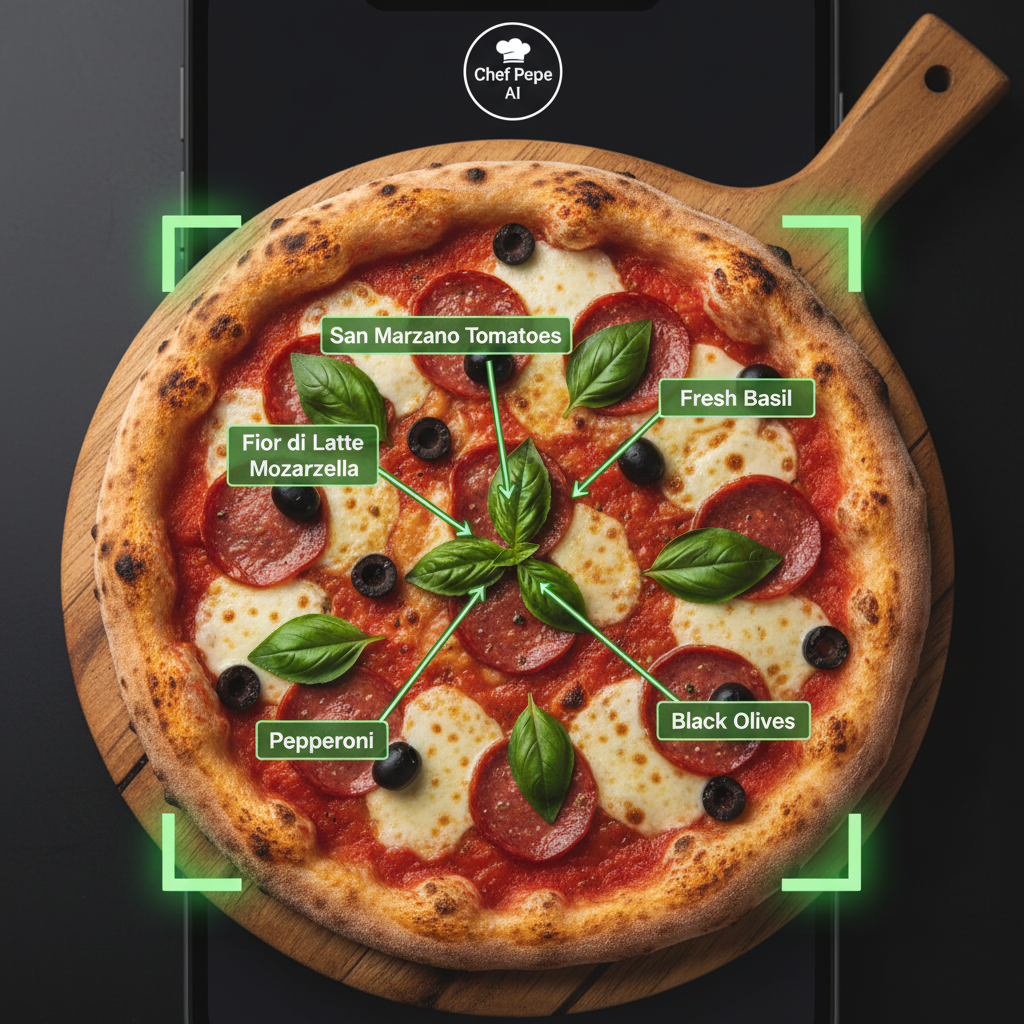
San Marzano
Confirmed
Fior di latte
Substitution →
Three ways to start.
Show Chef Pepe what you have — he handles the rest.
Show a Meal
Upload or photograph a dish you want to understand or recreate.
Chef Pepe identifies the dish, finds a recipe, and builds a step-by-step cooking plan.
Show Your Ingredients
Use what you already have and get meal ideas built around it.
Point your camera at your fridge, pantry, or shopping bag and get personalized meal suggestions.
Scan a Recipe
Turn printed, handwritten, or saved recipes into a guided cooking experience.
Photograph any recipe — from a cookbook, a note, or a screen — and Chef Pepe turns it into interactive steps.
Your privacy is protected.
Images are processed securely and are not stored without your explicit consent. We do not use your food photos to train AI models without permission. Supported formats: JPG, PNG, HEIC, WebP. Max 10MB.
Useful every day — and for the meals you never forgot.
From quick weeknight dinners to recreating that dish you had on vacation, See It. Cook It. works for every kind of food moment.
Restaurant recreations
Snap a dish you loved and recreate it at home.
Weeknight meals
Turn random fridge items into a real dinner.
Family recipes
Identify and preserve dishes passed down through generations.
Leftover ingredients
Use what you have before it goes to waste.
Cooking lessons
Learn techniques by showing Chef Pepe what you're working with.
Meal planning
Build a week of meals from a single photo of your pantry.
From picture to plate in three steps.
No complicated setup. No account required to try. Just show Chef Pepe what you have.
Show Chef Pepe
Take a picture or upload an image of any meal, ingredient collection, or recipe.
- Camera upload or file picker
- Drag and drop supported
- Works with any cuisine or dish type
Review the Plan
Confirm the dish, ingredients, substitutions, and difficulty level before starting.
- Chef Pepe shows what he identified
- Swap ingredients you do not have
- Adjust servings before you begin
Start Cooking
Follow visual step-by-step instructions or cook completely hands-free with voice guidance.
- Step-by-step visual instructions
- Voice mode: hands-free cooking
- Ask questions at any step
A note on accuracy
Chef Pepe provides helpful cooking guidance, but image recognition and recipe estimates may not be exact. Users should review ingredients, allergies, food safety, and cooking temperatures before proceeding. Always confirm with a qualified professional for dietary, medical, or allergy-related decisions.
Keep your hands on the food, not the screen.
Chef Pepe can read each step, wait until you are ready, repeat instructions, answer questions, adjust portions, and help when something does not look right.
- Reads instructions aloud at your pace
- "Next step" or "Repeat that" voice commands
- Answers mid-cook questions
- Adjusts quantities on the fly
- Captions and transcripts always available
Chef Pepe
Ready to guide you
Dice the onion into small, even pieces — about half a centimeter each.
Heat two tablespoons of olive oil in a pan over medium heat.
Add the onion and cook for five minutes, stirring occasionally.
Captions and transcripts are always available. Voice demo for illustration purposes.
Useful every day — and for the meals you never forgot.
Restaurant recreations · Weeknight meals · Family recipes · Leftover ingredients · Cooking lessons · Meal planning
Every cuisine, every skill level
From beginner grilled cheese to advanced French sauces — Chef Pepe adjusts his guidance to match your experience.
Use what you already have
No more wasted groceries. Show your fridge or pantry and get realistic meal ideas built around existing ingredients.
Smart substitutions
Missing an ingredient? Chef Pepe suggests practical swaps that preserve the dish's flavor and texture.
Cook for any group size
Adjust portions up or down instantly. Chef Pepe recalculates every ingredient automatically.
Truly hands-free
Keep your hands in the dough, not on your phone. Voice commands let you move through recipes without touching the screen.
Safety-first guidance
Chef Pepe includes food safety reminders, temperature guides, and allergen flagging throughout every recipe.
Safety & Accuracy Note
Chef Pepe provides helpful cooking guidance, but image recognition and recipe estimates may not be exact. Always verify cooking temperatures, allergen information, and ingredient quantities before preparing food. Do not rely on AI-generated nutritional data as medical advice. When in doubt, consult a professional.
Your next meal may already be in front of you.
Join early access and be first to try the full See It. Cook It. experience — with voice mode, image recognition, and Chef Pepe guidance.